
We want to inform our Irish customers of an important upcoming ComReg change in relation to sms messaging that will affect everyone who uses the sms messaging service in their practice. You need to register your Sender ID with Comreg to ensure your sms messages continue to be delivered to your patients. Your sender ID is the name that appears as the sender when you send an sms message. If you are unsure of what your sender ID is, you can send a test sms message to yourself from iMedDoc and this will display the sender ID. Your Sender ID can be three to eleven characters and you must ensure to register the exact Sender ID you are using.
If this registration with ComReg does not take place, the sender IDs will be replaced with ‘Likely Scam’ from 3rd July 2025 and the SMS messages will be completely blocked from 3rd October 2025. Organisations wishing to send SMS messages bearing Sender IDs must apply to register as Sender ID Owners.
To register your sender ID, go to the following link:
https://senderid.comreg.ie/sender-id-sign-up
To view the ComReg FAQ and information page:
Note: ComReg have informed us that Lanas cannot complete this process on your behalf, it must be completed by the owner of the Sender ID (SIDO). As Lanas are an independent software vendor (ISV), we are not permitted to register Sender ID’s on your behalf with ComReg.
Below is some information to help you complete the process of registering your Sender ID:
Step 1: Go to https://senderid.comreg.ie/sender-id-sign-up
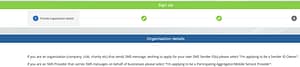
On the first screen you must enter your organisation details.
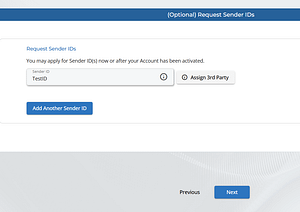
Step 2: Enter your exact Sender ID and click the “Assign 3rd party” button
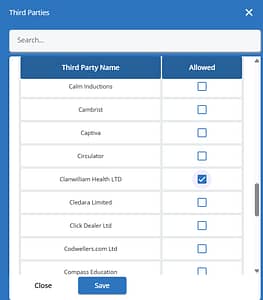
Step 3: Scroll down the list and select “Lanas Health Ltd” and click “Save” and then “Next”. If you use Billink, you must also select them from this list.
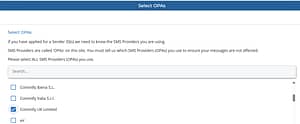
Step 4: Select OPAs – Scroll down the list and select “Commify UK limited” as your OPA.
Step 5: Click Next and agree to the terms and conditions and submit your application
Note: If you have any questions, please email [email protected] for assistance.
If you don’t have a CRO number, click “I don’t have a CRO number” and upload a letterhead or proof of business.
If the wrong name appears after entering your CRO number, re-enter your details manually.
If you don’t have a website, you can enter: https://www.imo.ie/ or https://www.irishcollegeofgps.ie/